
REDTHUNDER ONE-HANDED RGB
KEYBOARD & MOUSE COMBO
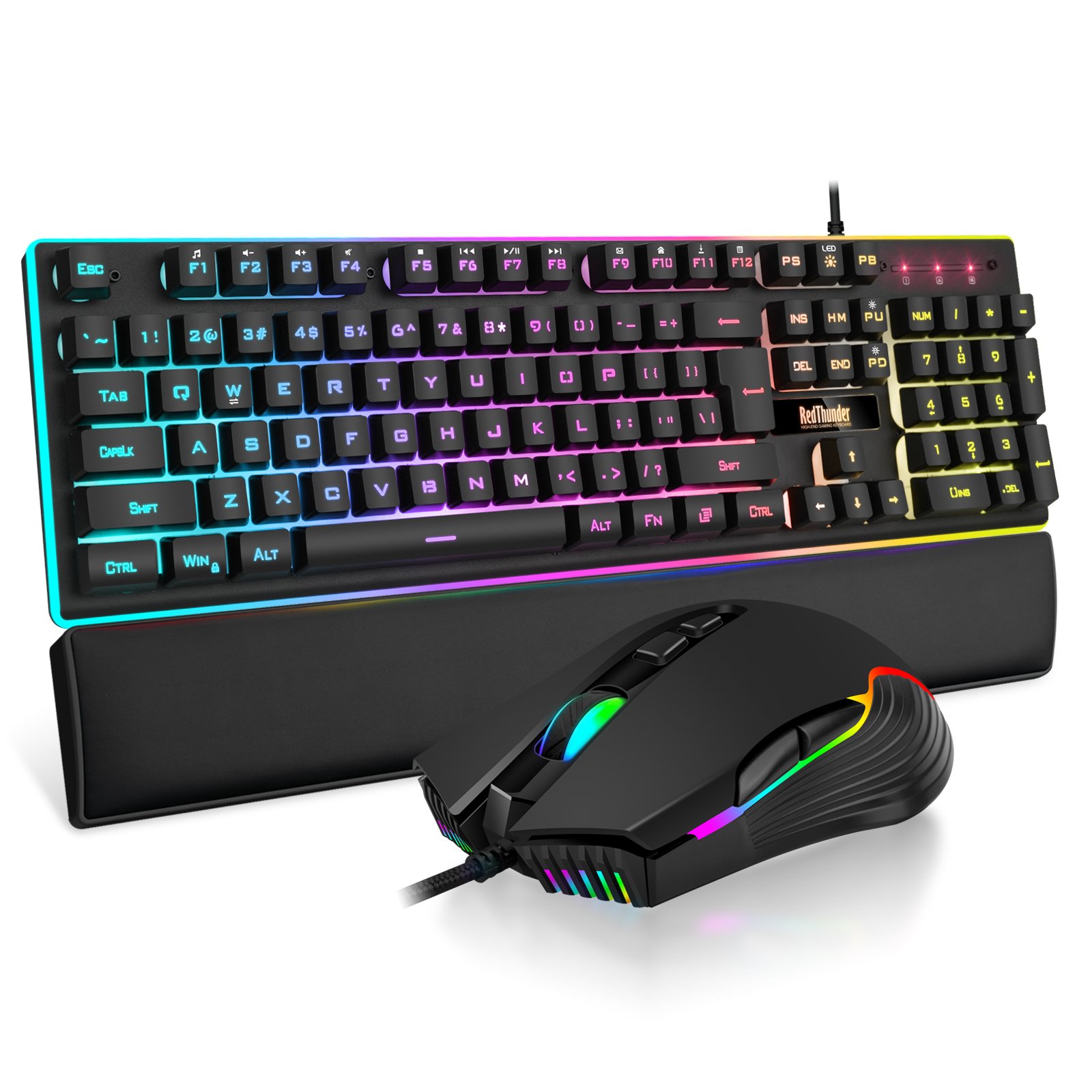
The RedThunder one-handed RGB gaming keyboard and mouse combo (G92) delivers dedicated left-hand gaming controls with professional 7-button programmable mouse in a complete wired setup. Featuring 35 optimally-placed keys with RGB backlighting, 2 macro recording keys, and oversized ergonomic wrist rest, this combo is engineered specifically for MMO, MOBA, and competitive gaming.
Perfect for gamers who want dedicated game controls, streamers needing separate chat and game keyboards, or anyone seeking an ergonomic gaming solution. The integrated large wrist rest ensures comfort during extended sessions, while full anti-ghosting and macro capabilities enable complex ability rotations and custom commands. The 6400 DPI programmable mouse with rapid-fire button provides competitive advantages in FPS and MOBA games.
Key Features
35-Key Gaming Layout
Optimized left-hand controls with all essential gaming keys and modifiers
6400 DPI Pro Mouse
11 DPI levels, 7 programmable buttons, rapid-fire button for FPS advantage
Macro Recording
2 programmable macro keys for complex ability rotations and custom commands
7-Color RGB
Breath and static lighting modes with adjustable speed and brightness
Ergonomic Wrist Rest
Oversized integrated palm support for marathon gaming sessions
Full Anti-Ghosting
All 35 keys support simultaneous input for accurate complex commands
Product Overview
35-Key Gaming Layout
The G92 features a carefully designed 35-key layout that includes all essential gaming controls in an optimized left-hand arrangement. The layout includes WASD movement keys, Tab, Shift, Ctrl, Alt, ESC, number keys 1-6, and critical function keys – everything needed for complex MMO rotations, MOBA item activation, or FPS weapon switching without reaching across a full keyboard.
Built-in game chip provides 3ms response time – faster than standard keyboards and crucial for competitive gaming where milliseconds determine victory. The compact footprint saves significant desk space while positioning all controls within easy reach of your left hand. This is perfect for MMO players who need quick access to dozens of abilities, MOBA gamers requiring instant item activation, or FPS players wanting dedicated movement and grenade controls.
Professional Gaming Mouse
The A867 gaming mouse delivers professional-grade performance with high-precision optical sensor featuring 11 DPI levels from 500 to 6400 DPI. Instantly adjust sensitivity to match different game scenarios – high DPI for fast rotations, low DPI for sniper precision. Four adjustable polling rates (125Hz/250Hz/500Hz/1000Hz) ensure smooth, high-speed cursor movement optimized for different game types.
Seven programmable buttons can be customized via included driver software for macro commands, ability shortcuts, weapon switching, or any custom function. The rapid-fire button provides significant advantage in FPS battles by executing three rapid left-clicks with single press – perfect for burst-fire weapons or spam clicking scenarios. This feature gives you the competitive edge during intensive combat.
Macro Recording Capability
The F1 and F2 keys support full macro recording, allowing you to record complex keystroke sequences and execute them with a single keypress. Perfect for MMO players who need to execute lengthy ability rotations, crafters who repeat manufacturing commands, or any gamer who wants to automate repetitive tasks. Each macro key can store different command sequences for maximum flexibility.
Macro Recording Instructions
How to Record Macros
- Step 1: Press FN + ESC until backlight starts flashing (recording mode active)
- Step 2: Input the keystroke sequence you want to record
- Step 3: Press FN + F1 or FN + F2 to save the macro to that key
- Use Macro: Simply press F1 or F2 to execute the recorded sequence
Clear Existing Macros
- Step 1: Press FN + ESC until backlight flashes
- Step 2: Press FN + F1 or FN + F2 to clear that macro slot
- The key returns to standard F1/F2 function when cleared
Macro Use Cases
MMO Games: Record entire ability rotation for DPS optimization or healing sequences. MOBA Games: Record quick item activation combos for instant burst damage. Strategy Games: Automate building queues or unit production commands. Productivity: Record frequently used text snippets, email signatures, or coding patterns.
RGB Lighting System
Keyboard Lighting Control
The keyboard features 7-color RGB backlighting with breath and static modes for customized aesthetics. Lighting effects create immersive gaming atmosphere while providing visibility in dark environments.
Lighting Shortcuts
- FN + F3: Cycle through 7 monochromatic colors and 1 mixed color mode
- FN + F4: Switch between breathing and static light modes
- FN + F5: Toggle RGB backlight on/off
- FN + 5: Decrease lighting effect speed
- FN + 6: Increase lighting effect speed
Mouse RGB Lighting
The mouse features Chroma RGB lighting system with up to 16.8 million color combinations. Seven lighting modes include Wave Mode, Four Seasons Mode, Waltz Mode, DPI Mode, Rainbow Mode, Rolling Mode, and Off. Use the LED button to cycle through modes or disable lighting entirely for stealth aesthetics.
Available Modes: Wave (flowing gradient), Four Seasons (color temperature shifts), Waltz (rhythmic pulsing), DPI (color indicates sensitivity level), Rainbow (full spectrum cycling), Rolling (scrolling wave effect).
Technical Specifications
| Feature | Specification |
|---|---|
| KEYBOARD (G92) | |
| Layout | One-handed gaming keypad (35 keys) |
| Switch Type | Membrane with good tactile feel |
| Response Time | 3ms (built-in game chip) |
| Anti-Ghosting | Full 35-key anti-ghosting (all keys simultaneously) |
| Macro Keys | 2 programmable macro recording keys (F1, F2) |
| RGB Lighting | 7 colors + 1 mixed color mode |
| Lighting Modes | Breathing and static modes |
| Wrist Rest | Integrated oversized ergonomic palm rest |
| Connection | Wired USB (plug and play) |
| Cable Type | High-quality braided cable |
| Design | Compact space-saving for portability |
| MOUSE (A867) | |
| Sensor Type | High-precision optical gaming sensor |
| DPI Range | 500 – 6400 DPI (11 levels) |
| Polling Rate | 125Hz / 250Hz / 500Hz / 1000Hz (adjustable) |
| Buttons | 7 programmable buttons |
| Special Feature | Rapid-fire button (1 click = 3 left clicks) |
| RGB Lighting | Chroma RGB (16.8 million colors) |
| Lighting Modes | 7 modes (Wave, Four Seasons, Waltz, DPI, Rainbow, Rolling, Off) |
| Programmability | Full macro editing via included software |
| Ergonomics | Soft comfortable surface with anti-slip sides |
| Connection | Wired USB |
| SOFTWARE | |
| Mouse Driver | RedThunder programming software (included on CD) |
| Keyboard Driver | Plug and play (no driver needed for basic functions) |
| Macro Capability | Keyboard: 2 keys via hardware recording. Mouse: All 7 buttons via software |
| COMPATIBILITY | |
| Operating Systems | Windows 10/8/7/Vista/ME, Mac, Linux, IBM |
| Gaming Consoles | PC gaming optimized (mouse programming requires Windows) |
| Setup | Plug and play – no mandatory driver installation |
| Package Contents | G92 Keyboard, A867 Mouse, Driver CD, User Manual |
| Warranty | 1 year manufacturer warranty |
Mouse Software Features
Programmable Functionality
While the mouse works perfectly with default settings for most users, installing the included driver software unlocks advanced customization. Program all 7 mouse buttons with custom macros, remap functions, or create game-specific profiles.
Driver Installation
- Insert included CD or download from RedThunder official website
- Install software (Windows only for programming features)
- Configure button assignments, DPI levels, and lighting preferences
- Save profiles for different games or applications
Macro Editing
Record complex keystroke and click sequences, assign them to any of the 7 mouse buttons, and execute them with single click. Perfect for MMO abilities, MOBA item combos, or repetitive tasks in productivity applications. The software provides intuitive interface for creating, editing, and managing macros.
Note: Mouse macro programming and advanced DPI customization require Windows operating system. Mac and Linux users can use the mouse with hardware default settings (works perfectly for standard gaming).
Ergonomic Design
Keyboard Comfort Features
The oversized integrated wrist rest fits the palm perfectly with soft, comfortable surface material suitable for extended use. The ergonomic structure ensures natural hand positioning that reduces fatigue during marathon gaming sessions. Unlike detachable wrist rests that shift during intense gameplay, the integrated design maintains consistent support.
The compact 35-key design eliminates unnecessary reach, keeping all controls within comfortable range of your left hand. This focused layout is significantly more ergonomic than stretching across a full-size keyboard, reducing shoulder and arm strain during extended gaming.
Mouse Ergonomics
The mouse features ergonomic curved design that fits naturally in the hand with soft, comfortable surface coating. Anti-slip textured sides ensure secure grip even during fast movements or intense battles. The design prevents the mouse from slipping out of control during rapid flicks or prolonged gaming sessions.
Setup & Usage
Quick Start Guide
- Step 1: Connect keyboard USB cable to available port
- Step 2: Connect mouse USB cable to second port
- Step 3: Devices activate automatically (no drivers required for basic use)
- Step 4: Optional: Install mouse driver CD for advanced programming
- Step 5: Use FN + F3 to select preferred lighting color
Optimal Positioning
Position the keyboard directly in front of your left hand with wrist rest supporting your palm. Place the mouse to the right at comfortable reaching distance. This separated layout is ideal for MOBA and MMO gaming where you need dedicated hotkey access with left hand while maintaining precise mouse control with right hand.
Ideal Use Cases
- MMO Gaming: Quick access to abilities, inventory, and macros
- MOBA Gaming: Dedicated item activation and ability shortcuts
- Streaming: Separate gaming keyboard from chat/OBS controls
- Productivity: Dedicated shortcut pad for photo/video editing
- Small Desks: Space-saving solution for cramped setups
Package Contents
- 1x RedThunder G92 One-Handed Gaming Keyboard (35-key)
- 1x RedThunder A867 Gaming Mouse (7-button programmable)
- 1x Mouse Programming Software CD
- 1x User Manual with Setup Instructions and Shortcut Reference
- 1x Warranty Card (1-year manufacturer warranty)
Perfect For: MMO gamers, MOBA players, streamers, content creators, and anyone seeking ergonomic dedicated game controls with powerful macro capabilities.