
REDTHUNDER K20 TKL WIRELESS
KEYBOARD & MOUSE COMBO
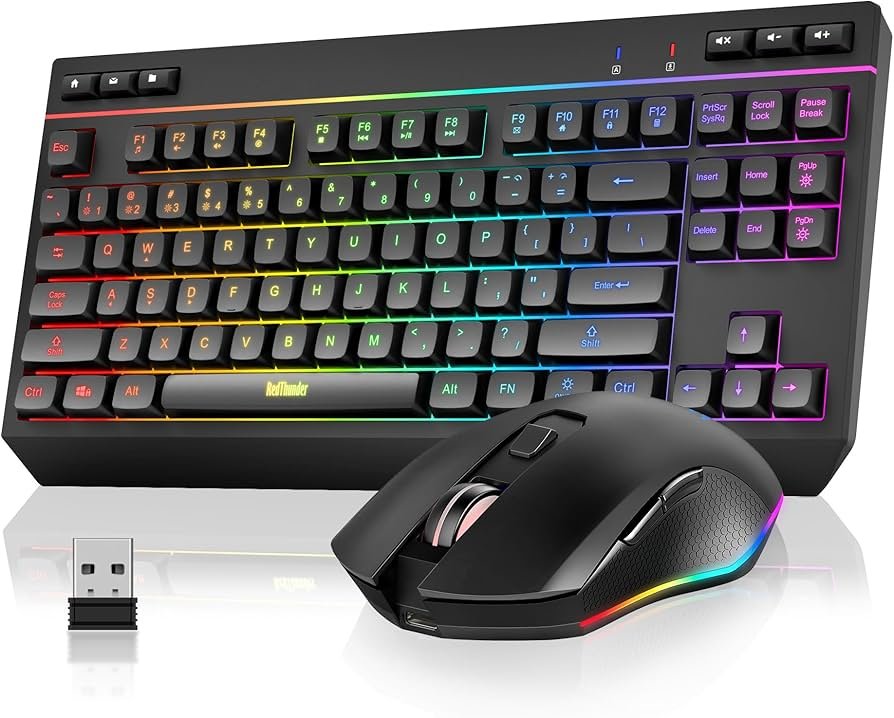
The RedThunder K20 TKL wireless gaming keyboard and mouse combo combines space-saving tenkeyless design with full RGB customization and dedicated multimedia controls. Featuring an 85% compact layout, adjustable RGB backlighting, and a lightweight 85g mouse, the K20 delivers premium wireless performance for gaming and productivity.
Designed for users who need multimedia functionality without the bulk of a full-size keyboard, the K20 TKL includes 6 dedicated multimedia keys while eliminating the numeric keypad. This creates more desk space for mouse movement while maintaining quick access to volume, playback, and other essential controls.
Key Features
TKL Layout
Tenkeyless design removes numeric pad, providing more space for mouse movement while retaining essential keys
6 Multimedia Keys
Dedicated controls for volume, playback, and media without using function combinations
Full RGB Lighting
4 dynamic effects, 7 monochrome modes, 1 rainbow mode with 4 brightness levels and adjustable speeds
2.4GHz Wireless
High-speed stable connection with single USB receiver for both keyboard and mouse
Rechargeable Battery
Long-life battery provides up to 8 hours continuous use with RGB lighting enabled
Lightweight Mouse
85g ergonomic design with 10 adjustable RGB backlights for comfortable extended use
Product Overview
TKL Design Philosophy
The K20 adopts a tenkeyless (TKL) layout that balances functionality with compact size. By removing the numeric keypad, the keyboard reduces its footprint by approximately 30% compared to full-size models. This creates valuable desk space for wider mouse movements – essential for low-sensitivity gaming and detailed creative work.
Multimedia Integration
Unlike many TKL keyboards that require function key combinations for media control, the K20 features 6 dedicated multimedia keys. These provide instant access to volume adjustment, playback controls, and other media functions without interrupting your workflow or gameplay. The intuitive placement ensures these controls are always within easy reach.
Wireless Performance
Utilizing 2.4GHz wireless technology, both the keyboard and mouse share a single USB receiver (located in the mouse bottom compartment). The stable connection minimizes input lag, making it suitable for competitive gaming and productivity tasks. Smart energy-saving functions automatically put devices to sleep after 1-3 minutes of inactivity, extending battery life significantly.
RGB Lighting System
The K20 features comprehensive RGB backlighting with extensive customization options. Unlike rainbow LED systems, true RGB allows for individual color selection and advanced lighting effects.
Keyboard RGB Modes
- 4 dynamic backlight effects with customizable speed
- 7 RGB monochrome lighting modes (single color selection)
- 1 RGB rainbow effect (full spectrum cycle)
- 4 brightness levels for ambient lighting control
- 4 breathing speed adjustments for dynamic effects
Mouse Lighting
The mouse includes 10 adjustable RGB backlight effects that can be controlled independently. An LED button on the mouse allows quick cycling through lighting modes to match your setup or preference.
Battery & Charging
Both the keyboard and mouse feature rechargeable batteries designed for extended wireless use. With RGB lighting enabled, expect approximately 8 hours of continuous operation. Disable lighting for significantly extended battery life lasting days or weeks depending on usage intensity.
Type-C Charging
- Type-C USB charging port on both devices
- Same charging cable works for both keyboard and mouse
- Mouse wheel illuminates during charging to indicate status
- Mouse automatically switches to wired mode when charging
- Can be used while charging for uninterrupted operation
Smart Power Management
Automatic sleep mode activates after 1-3 minutes of inactivity (configurable). Press any key or move the mouse to instantly wake the devices. When battery runs low, key response may slow or lights may flash – charge promptly to maintain optimal performance.
Technical Specifications
| Feature | Specification |
|---|---|
| KEYBOARD | |
| Layout | TKL (Tenkeyless) – 85% compact |
| Switch Type | Low-profile membrane (quiet operation) |
| Keycaps | ABS low-profile keycaps |
| Multimedia Keys | 6 dedicated multimedia function keys |
| Backlighting | RGB (4 dynamic modes, 7 monochrome, 1 rainbow, 4 brightness levels) |
| Battery Life | ~8 hours with RGB, extended without lighting |
| Charging Port | Type-C USB |
| Connection | 2.4GHz wireless (shared USB receiver) |
| Sleep Timer | 1-3 minutes of inactivity |
| MOUSE | |
| Weight | 85 grams (±5g) |
| Sensor Type | Optical |
| RGB Lighting | 10 adjustable backlight modes |
| Charging Port | Type-C USB |
| Charging Mode | Automatically switches to wired mode when charging |
| Connection | 2.4GHz wireless (shared USB receiver) |
| GENERAL | |
| Compatibility | Windows 2000/XP/7/8/10/11, Vista, Raspberry Pi 3/4, Limited MacOS |
| Receiver Location | Bottom of mouse |
| Package Contents | Keyboard, Mouse, USB Receiver, Type-C Charging Cable, User Manual |
| Warranty | 1 year manufacturer warranty |
Setup & Usage
Initial Setup
- Locate USB receiver in mouse bottom compartment
- Insert USB receiver into computer USB port
- Turn on keyboard and mouse power switches
- Devices will connect automatically (pre-paired)
- Keep USB receiver safe – both devices share one receiver
Lighting Controls
- ON/OFF key (next to Fn key) – Toggle power
- Fn + += : Increase RGB effect speed
- Fn + – : Decrease RGB effect speed
- LED button on mouse: Cycle through 11 RGB effects
Multimedia Keys
The 6 dedicated multimedia keys provide direct access to essential media controls without function key combinations. This streamlines workflow for content creators, office users, and gamers who frequently control media playback.
Package Contents
Complete wireless setup with Type-C charging
- 1x RedThunder K20 TKL Wireless Gaming Keyboard
- 1x RedThunder Wireless Gaming Mouse (85g)
- 1x 2.4GHz USB Wireless Receiver
- 1x Type-C USB Charging Cable (works for both devices)
- 1x User Manual with Setup and Pairing Instructions